

Prove the training worked, not that people attended
Nialtus measures a course the way Kirkpatrick set it out: what people thought of it, what they learned, whether they use it at work, and what moved in the business. Every level is a switch you turn on per course.
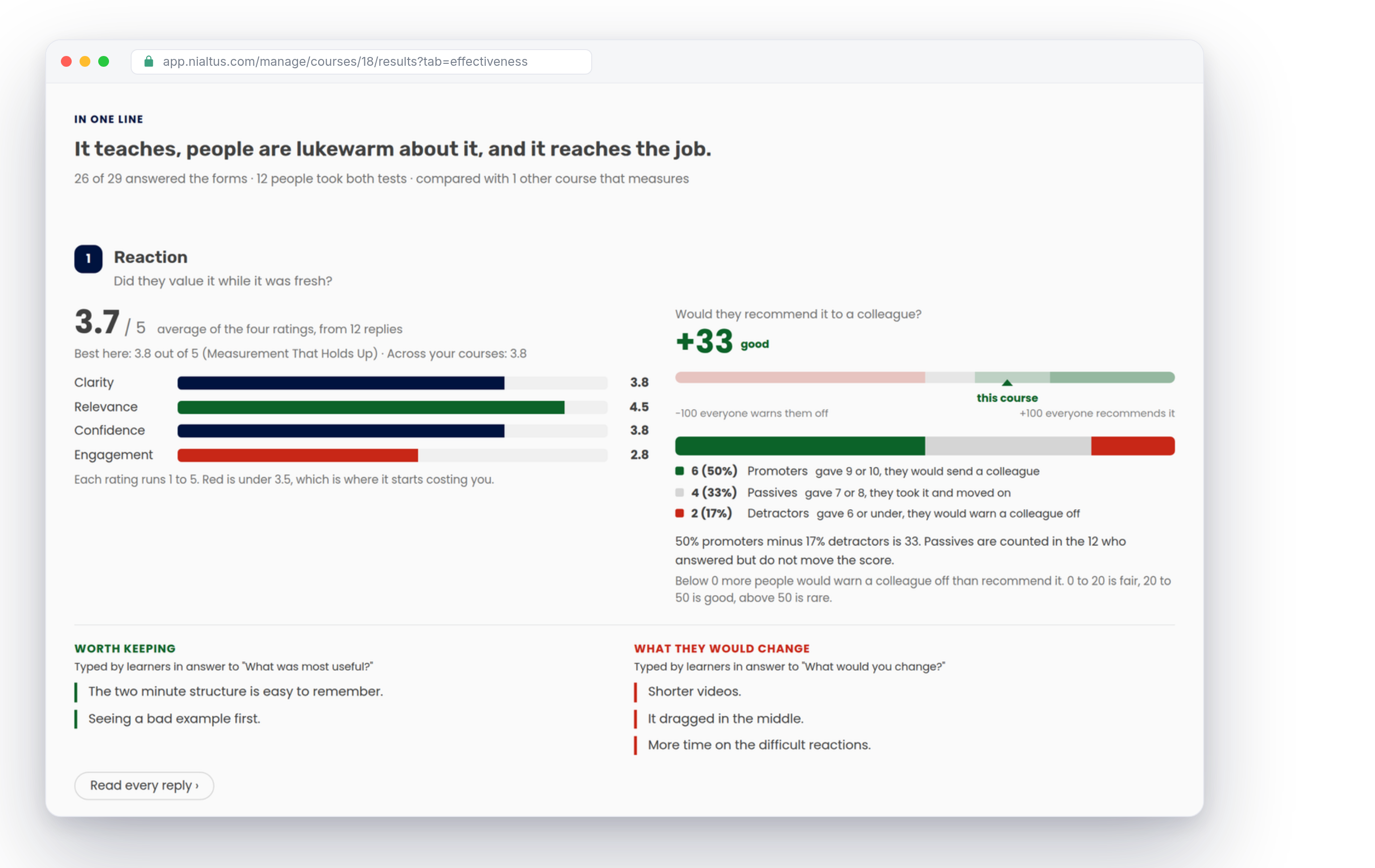
A completion rate is not evidence.
Most reporting tells you who finished. None of it tells you whether the course taught anything, whether it survived contact with the job, or whether the number you built it for actually moved.
Four levels, one screen
The framework training teams and auditors already use, built into the course rather than bolted on after it.
Reaction
A short form the moment they finish: was it relevant, clear, engaging, and do they feel able to apply it, plus whether they would recommend it to a colleague. Ratings out of five, a recommend score, and what they typed in their own words.
Learning
A pre-test before the course and the same questions again at the end. Before, after, the gain in points, how much of the available improvement was actually taken, and which questions never moved.
Behavior
Weeks later, a follow-up asks whether they have used it, how often, how much they remember and what got in the way. Their manager can be asked the same thing about them, and the two answers are shown side by side rather than averaged together.
Results
The business number you built the course for: scrap rate, first-call resolution, grievances raised, safety incidents. You record the baseline, the target and where it is now, and the report shows the movement against the three levels above it.
One exam, not two
The strongest before-and-after comparison is the same paper twice, so the course’s own final quiz can be the post-test. Turn the pre-test on and it mirrors that quiz question for question; edit the quiz later and the pre-test stays in step. Nobody sits two exams, and the gain you report is the same question answered twice by the same person.
When a course has no quiz of its own, or came in as a package you cannot edit, the pre-test and post-test sit around the course instead. That is the whole design: the tests wrap the course rather than living inside it, so an imported SCORM module is measured exactly like something you authored here.
A question bank, drawn once and locked
Point a test at a bank and ask for any ten of forty. Two people sit different papers, which is what you want when they are in the same room. The draw is then locked to each learner: the same questions, in the same order, with the answers in the same order, come back at the end.
That is the difference between a gain you can defend and a number that moved because the second paper was easier. Shuffling questions and shuffling answers are separate switches, on evaluation tests and on ordinary quizzes.
The pre-test shows the score, never the answers
A learner sees how they did and nothing else. Which questions they got right is deliberately withheld, because the same questions are coming back at the end and a pre-test that hands out the answer key measures memory, not teaching.
You can also require the pre-test before the course opens, which the platform enforces on the course page, a direct lesson link and a SCORM launch alike. A pre-test taken afterwards measures nothing.
Feedback forms that go out when you say
Every workspace starts with two forms: a reaction form for the moment they finish, and a follow-up for weeks later. Both can be edited, and you can write your own and reuse them across courses.
Schedules are per course: as soon as they finish, a set number of days later, repeating every so often a set number of times, or when they enroll. Each schedule has a window and an optional reminder, and a form can go to the learner or to their manager about the learner. Nobody is invited twice for the same schedule, so you can change your mind after people have started.
A report that reads as a story
The Effectiveness screen opens with one sentence it works out for itself, then walks the four levels in order and ends with what to do about it. Every piece of jargon is explained with your own numbers rather than named and left there: normalized gain is written as “they walked in knowing 40% of it, so there were 60 points left to win, and they picked up 37 of them”, and the recommend score is drawn on the scale it lives on with its bands marked.
Nothing is a wall of figures. Ratings are bars, before and after are bars, the learner’s answer and their manager’s answer are two charts side by side, and the business number is a movement in green when it went the way you wanted and red when it did not, which is not the same as up and down.
Compared against your own catalog
A number on its own says nothing. Reaction, learning, recommend score and behavior are each shown against the best course in your workspace and your average across every course that measures, so you can see whether 37 points of gain is good here or merely average.
The published bands are there too, from the education research the measures come from, in plain language rather than as a citation.
Every reply, and every figure, on the way out
Averages tell you the shape of a room. One person’s sheet tells you why. The Replies tab lists the feedback forms themselves, newest first, rendered the way they were asked, with a manager’s answer about somebody labelled as one and an anonymous form keeping its answers while dropping the name.
Download CSV gives you the tab you are looking at for the whole cohort: one row per person, one row per figure, or one row per answer. Print or save as PDF prints the report itself, charts and all, for the people who want it on paper.
How it works
From switching it on to reading the answer.
Open a course, click Measurement, and switch on reaction, learning, behavior or results. Everything is off until you turn it on, per course, so nothing is asked of a learner you did not ask for.
Use the course’s own final quiz as the post-test and mirror it as the pre-test, draw from a question bank, or write a separate paper. Set whether the pre-test gates the course and whether the certificate waits for the post-test.
Pick the reaction form and the follow-up, and say when each goes out and to whom. Reuse the same forms across courses, or write ones that match how your organization asks.
When there is one, enter its baseline, its target, the period, and where it is now. This is the only level no platform can measure for you, and the report is honest about that.
The Effectiveness tab tells you what happened and what to fix. Take the figures as CSV, the report as PDF, and the comparison across every course from Insights.
What this changes
The difference between reporting activity and reporting effect.
What you get
Every part of it is a switch, not a project.
Learning Everest has spent years being asked by clients to prove that training worked. Nialtus is where that question stopped being a slide in a report and became part of the course.
Questions about measurement
Straight answers on how far this goes and where it stops.
Send us a course and the number it is meant to move, and we will show you the report it produces.

The LMS that builds courses with you, wraps them in your brand, and keeps every team coming back.
© 2026 Nialtus · Part of Learning Everest Private Limited · Privacy · Cookies · Terms