
Languages & localization

One platform, every language your people speak

Run the platform in 41 languages, with more added regularly, translate your courses with AI in a click, and lay Arabic out right to left as it should be. Each workspace turns on the languages it wants, and each learner picks their own.
Nialtus course translated into multiple languages
A growing list of languages
Translation management
AI translation
Right-to-left
Learner choice
Translate the UI too

Languages available today

The Nialtus interface is available in 41 languages today, with more added regularly. Courses can be translated into any of them.

  • English
  • ArabicRTLالعربية
  • Bengaliবাংলা
  • Chinese (Simplified)简体中文
  • Chinese (Traditional)繁體中文
  • CzechČeština
  • DutchNederlands
  • Filipino
  • FrenchFrançais
  • French (Canada)Français (Canada)
  • GermanDeutsch
  • Gujaratiગુજરાતી
  • Hindiहिन्दी
  • HungarianMagyar
  • IndonesianBahasa Indonesia
  • ItalianItaliano
  • Japanese日本語
  • Kannadaಕನ್ನಡ
  • Korean한국어
  • MalayBahasa Melayu
  • Malayalamമലയാളം
  • Marathiमराठी
  • Nepaliनेपाली
  • Odiaଓଡ଼ିଆ
  • PolishPolski
  • Portuguese (Brazil)Português (Brasil)
  • Portuguese (Portugal)Português (Portugal)
  • Punjabiਪੰਜਾਬੀ
  • RomanianRomână
  • RussianРусский
  • Sinhalaසිංහල
  • Spanish (Latin America)Español (Latinoamérica)
  • Spanish (Spain)Español (España)
  • SwedishSvenska
  • Tamilதமிழ்
  • Teluguతెలుగు
  • Thaiไทย
  • TurkishTürkçe
  • UkrainianУкраїнська
  • UrduRTLاردو
  • VietnameseTiếng Việt
RTL marks a language that reads right to left. This list updates automatically as new languages are added.

Three ways a global team learns as one

Not an English course with subtitles, but a platform that speaks your languages.

The whole thing, translated

Not just course content. The platform interface is available in 41 languages today, with more added regularly, so a learner in Cairo and one in Jakarta each see it in their own language.

Translate in a click

Turn an existing course into another language with AI, then have a native speaker review. Manage every translation in one place.

Right to left, properly

Arabic is not an afterthought. The whole layout flips to right to left so the experience feels native, not bolted on.

Translate a course without starting over

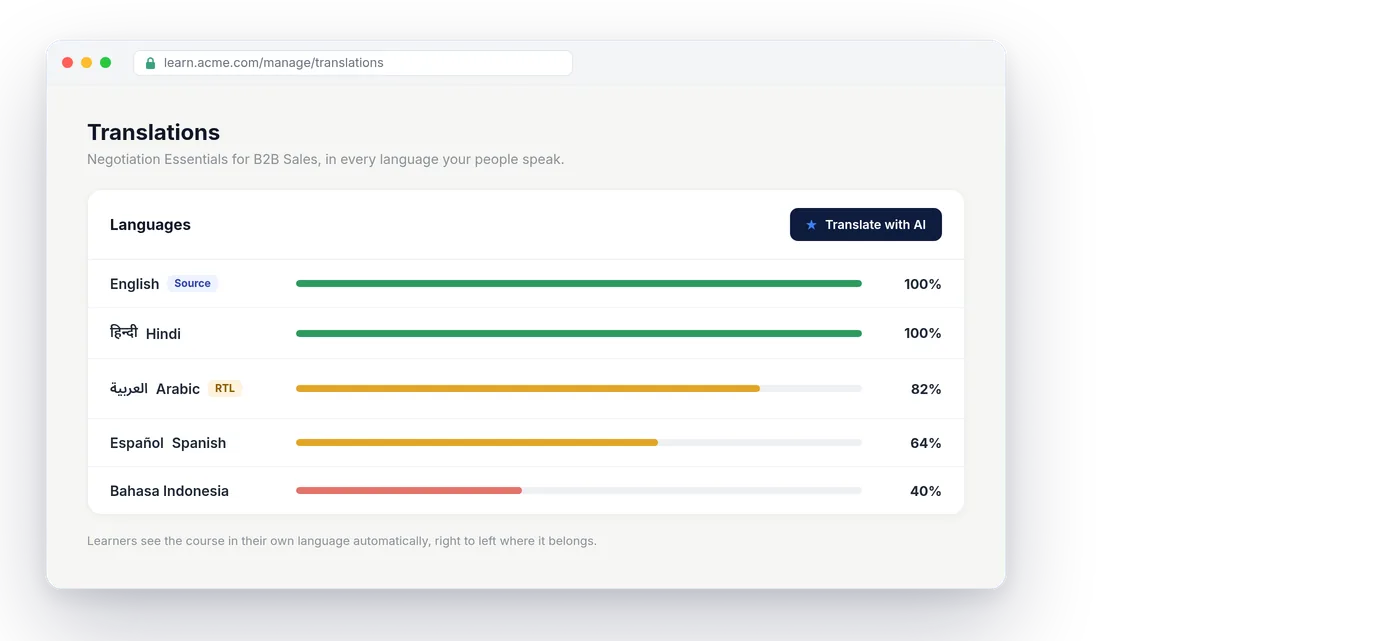
Take a course you already built and translate it into another language with AI, then let a native speaker refine it. Every language sits in one translation view, so you always know what is done and what is left.

  • AI translation of existing courses
  • One place to manage every language
  • Learners pick their own language
Negotiation Essentials: translation progress
One course, four languages
English (source)100%

The original course
Hindi100%

Published
Arabic82%

9 lessons to review
Spanish64%

AI draft ready for review
Right to left, done right
التفاوض الفعّال
كل درس ومسار وشهادة تظهر بلغة المتعلّم واتجاهها الصحيح.
Arabic, laid out the way it should be

Right to left, exactly right

For Arabic, the whole interface mirrors, so text, layout, and navigation read the way a native speaker expects. It is the difference between usable and truly localized.

  • Full right-to-left layout, not just text
  • A native feel, not a translation patch
  • Each learner picks their own language

Localization that goes all the way

From the platform chrome to the last lesson, in the languages your teams speak.

A growing list of languages
Available in 41 languages today, with more language packs added regularly.
Translation management
Track what is translated and what is left, in one place.
AI translation
Translate an existing course in a click, then review.
Right-to-left
Arabic laid out fully right to left, the way it should be.
Learner choice
Turn on the languages you want; each learner picks their own.
Translate the interface
The platform chrome speaks their language too.

Learning Everest has delivered learning in many languages for global clients. Nialtus makes localization first-class, so a worldwide team learns as one, each in their own language.

Questions we hear a lot

Straight answers about running a multilingual program.

Want it in your languages?

Book a demo and we will translate a course and show it right to left.

Book a demo

Today the platform interface is available in 41 languages: English, Arabic, Bengali, Chinese (Simplified), Chinese (Traditional), Czech, Dutch, Filipino, French, French (Canada), German, Gujarati, Hindi, Hungarian, Indonesian, Italian, Japanese, Kannada, Korean, Malay, Malayalam, Marathi, Nepali, Odia, Polish, Portuguese (Brazil), Portuguese (Portugal), Punjabi, Romanian, Russian, Sinhala, Spanish (Latin America), Spanish (Spain), Swedish, Tamil, Telugu, Thai, Turkish, Ukrainian, Urdu and Vietnamese. The list keeps growing as new language packs are added, and some languages come in regional versions, such as French and French (Canada), so the wording fits where your people work. Arabic is fully right to left. Course content is translated separately with AI, per course and per language.
Yes. Ask Nia, the admin assistant, a question in any language the platform supports, such as Arabic, Hindi or Spanish, and the answer comes back in that language, figures and labels included, even when the screen is in English. Arabic and Urdu answers read right to left. Names of people and courses stay as they were entered.
Yes. AI translates a course you already built, and a native speaker can review before it goes live.
Yes. Arabic gets a fully mirrored right-to-left layout, not just translated text.
Yes. Each workspace turns on the languages it wants, and each learner picks their own, so a team in one country and a team in another each see the platform in their language.

Let every team learn in its own language

Book a demo and we will translate a course and show it right to left.