
Certificates

A certificate they will be proud to share

Issue a branded certificate the moment someone finishes, design it to look like it came from you, and give it a credential ID they can add to LinkedIn. Recognition that feels earned, not automated.
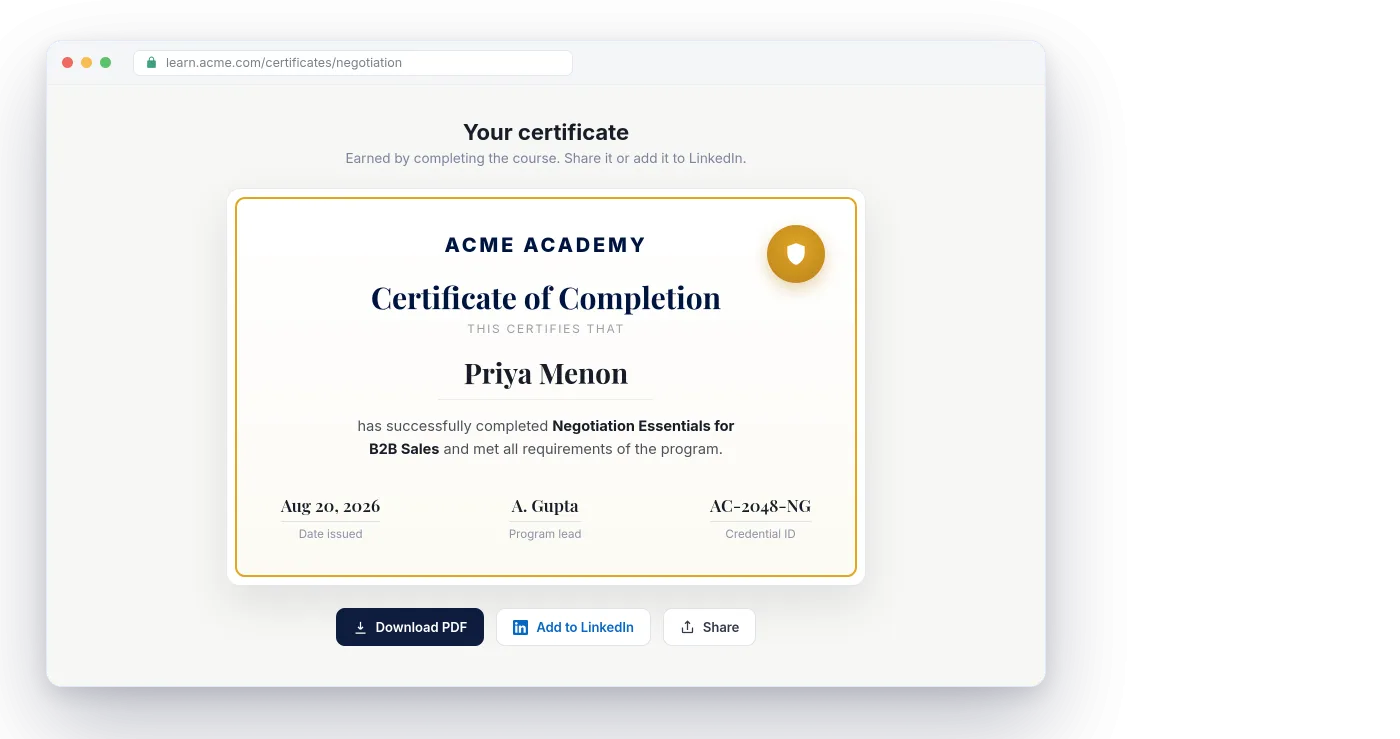
Nialtus certificate with online verification
Auto-issued
Your own design
Credential ID
Add to LinkedIn
Downloadable PDF
Verifiable

Three reasons your certificates will mean something

Automatic for you to run, and genuinely valued by the people who earn them.

Automatic, never forgotten

A certificate is awarded the second the last requirement is met, with a unique credential ID. No manual sending, no learner asking where theirs is.

Unmistakably yours

The designer puts your logo, colors, signature, and seal on every certificate, and tailors the wording to the kind of program, so it looks like it came from you.

Shared and verifiable

Learners add it to LinkedIn or download a PDF, and anyone with the link can confirm it is genuine. The version they share is always the one you can verify.

Issued the moment they finish

Set a certificate on a course or a path, and it is awarded automatically the second the last requirement is met. No manual sending, no forgotten certificates, no learner asking where theirs is.

  • Awarded automatically on completion
  • Every certificate gets a unique credential ID
  • Learners download a PDF or add it to LinkedIn

Certificate issued
Priya Menon · just now
CourseNegotiation Essentials
Credential IDAC-2048-NG
Issuedautomatically
Certificate designer
Accent

Design it in your brand

Use the certificate designer to set your logo, colors, signature, and seal, and Nialtus tailors the wording to the kind of program. A completion looks different from a certification, and both look like they came from you, not from us.

  • Your logo, colors, signature and seal
  • Type-aware wording for each kind of program
  • One template, reused across every course

Shared, and verifiable by anyone

Every certificate carries a credential ID and a public link, so a manager or an auditor can confirm it is genuine in seconds. Learners add it to their LinkedIn profile or download a PDF, and the version they share is always the one you can verify.

  • A public link that confirms the certificate is valid
  • One click to add it to a LinkedIn profile
  • Download a PDF to attach, print, or email

Certificate verified
Credential AC-2048-NG
Priya Menon completed Negotiation Essentials, issued by acme academy on Aug 20, 2026.
Add to LinkedInShare link

Recognition, handled properly

Certificates that are automatic for you and meaningful for your people.

Automatic issue
Awarded the moment the last requirement is met.
Certificate designer
Your logo, colors, signature, and seal.
Type-aware wording
A completion reads differently from a certification.
Credential ID
Every certificate is uniquely identifiable.
Add to LinkedIn and share
One click to a learner’s profile, plus a PDF and a share link.
Public verification
Anyone with the credential link can confirm it is genuine.
Path certificates
Award one at the end of a whole learning path.
External certificates
Learners upload certificates earned elsewhere, and an admin or their manager reviews them.

Learning Everest has issued and verified certificates for enterprise programs for years. Nialtus bakes that experience into every credential your people earn.

Questions we hear a lot

Straight answers, so you know what you are getting before you switch it on.

Have a question we missed?

Ask us on a quick call and we will walk you through it in your own setup.

Book a demo

Yes. The certificate designer sets your logo, colors, signature, and seal, and you can keep different templates for different programs.
They can. Set a validity period and it flows into compliance, so people are reminded to recertify before they lapse.
Every certificate has a credential ID and a public link. Anyone with the link can confirm it is genuine, without needing an account.
Yes. Award a certificate at the end of a single course, or at the end of a full learning path.
Yes, on Launch and above. A learner uploads the certificate as a PDF or image with the issuer and dates, and it goes to a review queue. Compliance admins, or the learner’s own manager, approve or reject it with a reason. An approved certificate can count toward a certification, so it appears in compliance reports and expiry reminders, marked as External. Nobody can approve their own upload.
Yes. Every certificate and earned badge is published as an Open Badges 2.0 assertion and an Open Badges 3.0 signed credential, with your organization as the issuer. Learners add it to a free digital wallet app by scanning a QR code, download the badge image, or add it to LinkedIn, and anyone can check it. Staff without a work email can claim theirs with a personal email or phone number. Delete a certificate and its badge reads as revoked everywhere it was shared.

See your certificate on your demo

Bring your logo and we will design a certificate in your brand on the call.