

Live sessions

Instructor-led training, in the same place as everything else

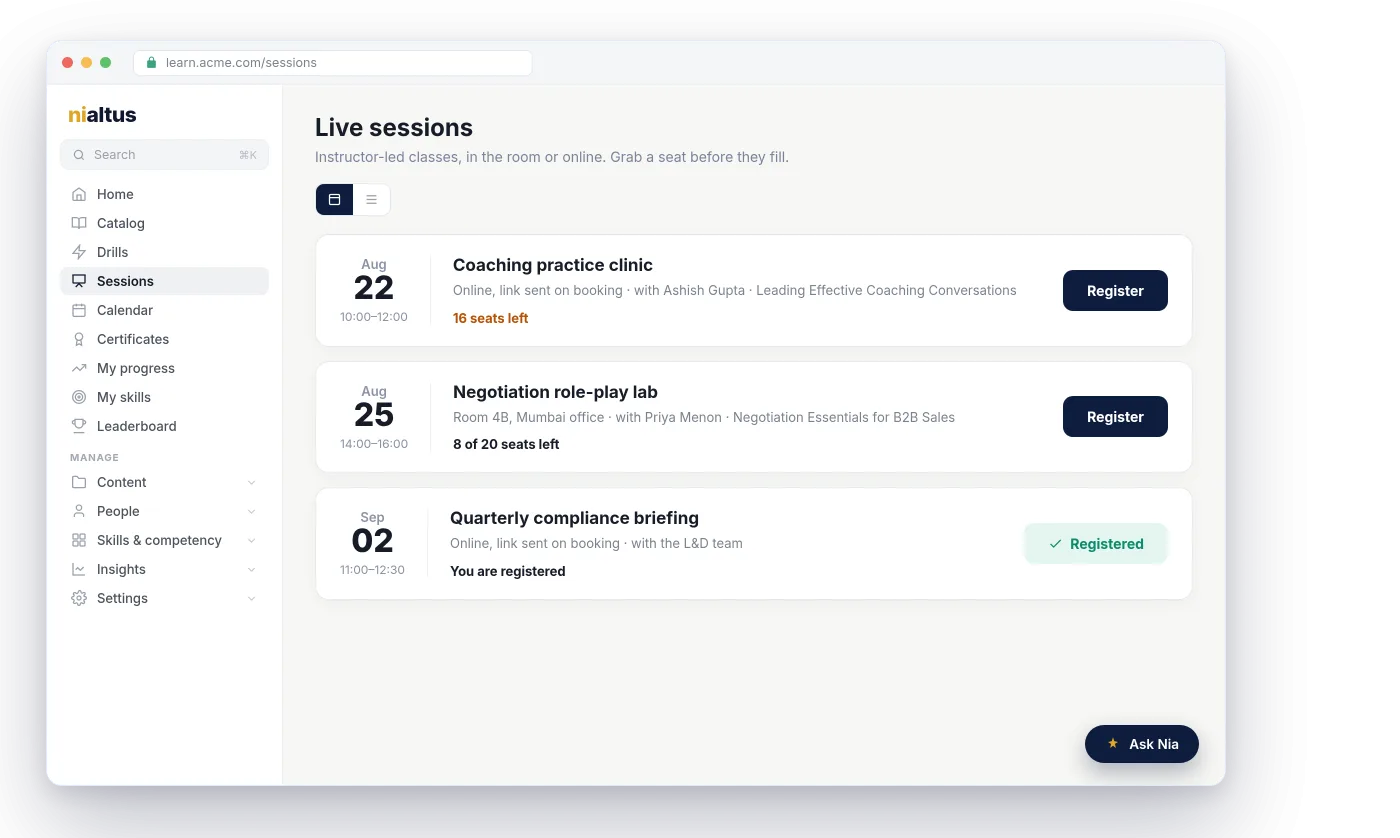
Run classroom or online sessions right inside Nialtus. Publish a schedule, take bookings with seats and waitlists, mark attendance, and tie it all back to the course, no separate tool to wrangle.
Nialtus live session scheduling
Classroom or online
Seats & waitlists
Attendance tracking
On the calendar
Register in a click
Part of the course

Three reasons live training belongs here

One place for instructor-led and self-paced, so nothing lives in a separate spreadsheet.

Book without the back-and-forth

Publish a schedule and let people book their own seat. When a session fills, the next person joins a waitlist and moves up automatically if someone drops.

Attendance that counts

Mark who showed up and it rolls into the learner’s record, right next to their courses and certificates. No side register to reconcile.

Part of the whole program

Attach a session to a course so live and self-paced learning count together, and it shows on the learner’s calendar with reminders.

Fill the room, then keep a waitlist

Set the number of seats and let people book themselves in. When a session fills, the next person joins a waitlist and moves up automatically if someone drops. No spreadsheets, no double-booking, no chasing.

  • Cap seats and open self-service booking
  • Automatic waitlists when a session is full
  • Reminders so fewer people no-show
Coaching practice clinic
Aug 22 · 10:00–12:00 · Online
Seats booked9 of 25
PMPriya Menon Booked
RKR. Khan Booked
LTLena Torres Waitlist
Coaching skills workshop
Rescheduled
New time
Thu, Nov 12, 11:00 AM (was 10:00 AM)
Updated invite sent
18 booked, 2 waitlisted
Sent
Calendars update in place, with no duplicate entries

Change a session and every calendar follows

Edit the time, place, meeting link, trainer or capacity, and everyone booked or waitlisted gets an email with an updated calendar invite. Cancel a session and people get a cancellation for their calendar, an optional reason, and a link to book another date. Repeat a session weekly or every other week, or duplicate it in one click.

  • Updated calendar invites on every change
  • Cancel with another session offered
  • Weekly or every-other-week series

A roster you can actually run

Add people from a search, a whole department, or a pasted list of emails. Seats fill first, then the waitlist, and a freed seat moves the next person up. Move someone to another date, mark attendance for several people at once after the session starts, and export the roster as a CSV or a printable sign-in sheet.

  • Add by person, department or email list
  • Move people between dates
  • Printable sign-in sheet and CSV
Roster
18 of 20
PM
Priya Menon
Booked
Attended
RK
Rahul Khanna
Booked
Move
LT
Lena Torres
Waitlist, position 1
Remove

Everything a live program needs

Blend live sessions with self-paced courses in one program, and track it all together.

In-room or online
Run a classroom session or a webinar, with the link sent on booking.
Seats and waitlists
Cap capacity and let waitlisted people move up automatically.
Attendance
Mark who showed up, and roll it into their record.
On the calendar
Sessions show up on the learner’s calendar with reminders.
Tied to a course
Attach a session to a course so live and self-paced count together.
Self-service booking
People book their own seat, with reminders to cut no-shows.
Zoom, Teams and Google Meet
On Growth and above, the meeting is created in your own account and attendance comes back. See Zoom, Teams and Meet.
Updated invites
Reschedules, edits and cancellations update every calendar invite.
Sign-in sheets
Print a sign-in sheet as a PDF, or export the roster as a CSV.

Learning Everest has run instructor-led programs for enterprise clients for years. Nialtus handles the logistics, seats, waitlists, and attendance, the way a facilitator actually needs them.

Questions we hear a lot

Straight answers about running live training in Nialtus.

Want to see it scheduled?

Book a demo and see how a session, a course, and a certificate fit together.

Book a demo

Both. Hold a session in a room, paste your own meeting link, or on Growth and above let Nialtus create a Zoom, Microsoft Teams or Google Meet meeting for it. The join link goes into every invite and appears for booked learners from 15 minutes before the start.
Cap the number of seats and people book themselves in. Once full, the next person joins a waitlist and moves up automatically if someone drops.
Yes. Mark who attended and it rolls into the learner’s record alongside their courses and certificates.
Yes. Attach it to a course so live and self-paced learning count together in one program.
No. The call runs in your own Zoom, Microsoft Teams or Google Meet account. On Growth and above, Nialtus creates and updates the meeting for you and reads attendance back for a trainer to review. See Zoom, Teams and Google Meet.
Everyone booked or waitlisted gets an email with an updated calendar invite. If a session is canceled, they get a cancellation for their calendar and a link to book another date.
Yes. Export any roster as a printable sign-in sheet PDF or as a CSV.

Blend live and self-paced in one program

Book a demo and see how a session, a course, and a certificate fit together.