

For course authors

Version history, prerequisites and scheduled publishing

Undo a mistake, restore any earlier version, bring back a deleted lesson, require the right courses first, and publish or take down a course on a schedule. Version history is on every plan.
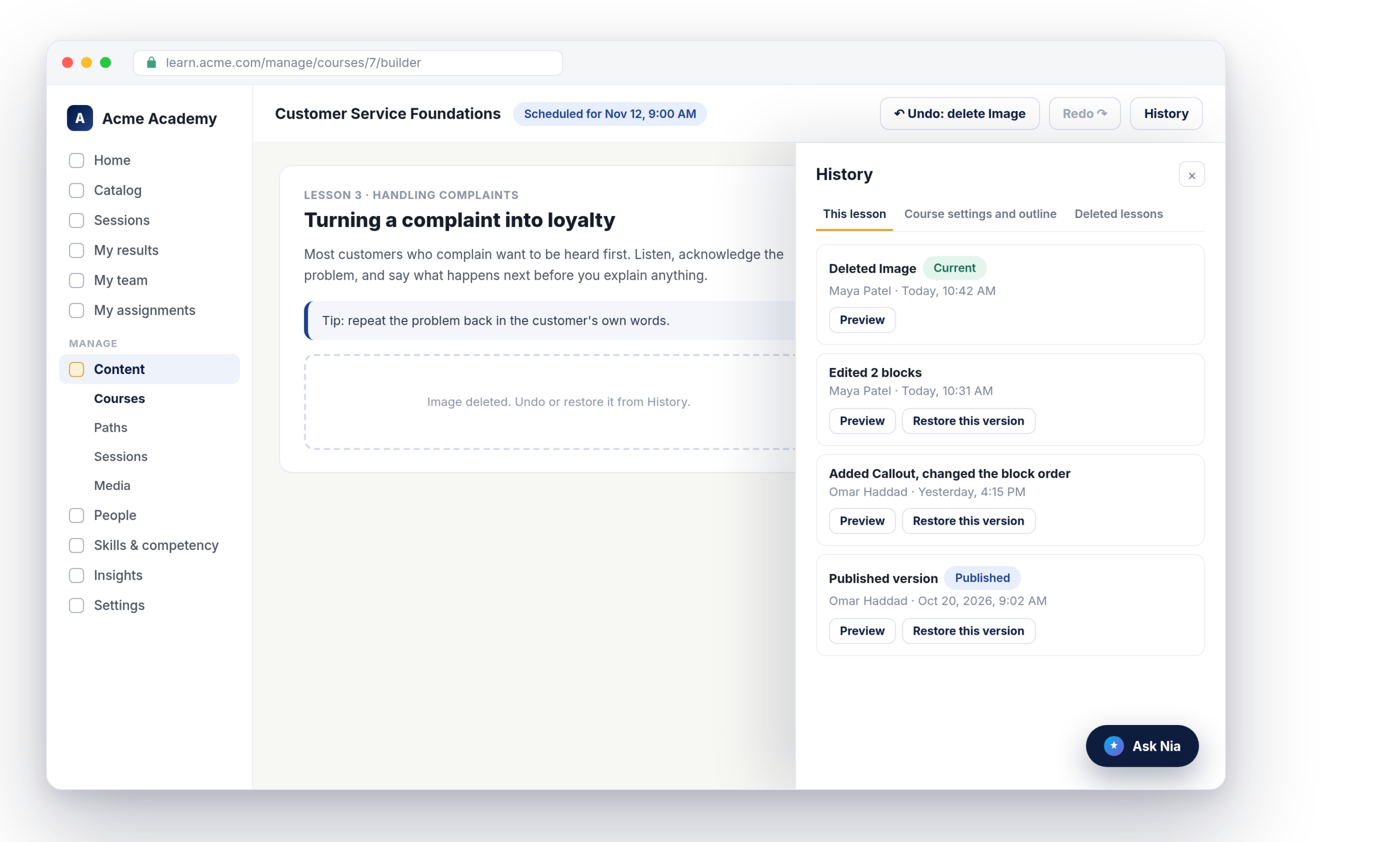
Nialtus course builder with the History panel and Undo button
Undo and redo
Restore any version
Recover deleted lessons
Enforced prerequisites
Scheduled publishing
Checks before going live

Edit with confidence

Authors work faster when nothing they do is permanent by accident.

Nothing is lost

Every save is kept as a version, with who changed what and when. Deleted blocks, sections and lessons can come back, and restoring never wipes the history.

The right order

Make a course wait until a learner has finished other courses, a learning path or a certification. Assigned learners are let through, with a note, so nobody is stuck.

Live on time

Set a course to go live at a date and time, and to come down later. The same checks as the Publish button run first, so a broken course never goes live by itself.

Undo, redo and a full history

Undo and Redo sit in the builder’s top bar and say what they will do, such as “Undo: delete Image”. Ctrl+Z works too. History lists every version of the lesson and the course outline with a plain summary like “Edited 2 blocks”, who saved it and when. Preview any version, then restore it.

  • Undo and redo with clear labels
  • Preview before you restore
  • Published versions marked in the list
History
This lesson
Deleted Image
Maya Patel · Today, 10:42 AM
Current
Edited 2 blocks
Maya Patel · Today, 10:31 AM
Restore
Published version
Omar Haddad · Oct 20, 2026
Restore
Deleted lessons
Lesson 5 · Escalation paths
Deleted by Omar Haddad, Oct 21
Restore lesson
Lesson 6 · Wrap-up quiz
Deleted by Maya Patel, Oct 18
Restore lesson
Comes back in its old section, with its blocks

Restores that protect learner records

A deleted block comes back under its old identity, so quiz attempts and progress line up again. A deleted lesson returns to its section with its blocks. If a block already has learner answers, a restore keeps it rather than removing it, and tells you. The files behind deleted pictures, videos and captions stay in the media library.

  • Deleted lessons in their own tab
  • Answered blocks are never removed
  • Every restore recorded in the audit log

Prerequisites and a publishing schedule

In course settings, require up to ten courses, a learning path or a certification. Learners who enroll themselves see what to finish first, with links, and the catalog shows “Requires” on the card. In the same drawer, set a publish time and an optional take-down time, back to draft or archived. If a check fails at publish time, the course stays a draft and the author is told why.

  • Courses, a path or a certification as prerequisites
  • Learners already enrolled are never locked out
  • Publish and take down at a set time
Publishing schedule
Scheduled
Publish on
Thu, Nov 12, 2026, 9:00 AM
Take down on
Fri, Jan 15, 2027, back to draft
Prerequisite
Customer Service Basics
Required

What authors get

Built into the course builder.

Undo and redo
The last ten actions in a builder session, with keyboard shortcuts.
Version history
The last 50 versions of each lesson, plus published snapshots.
Recover deleted work
Blocks, sections and lessons come back with their old identity.
Enforced prerequisites
Courses, a learning path or a certification, checked at enrollment and launch.
Scheduled publishing
Go live and come down at times you set, in your workspace time zone.
Pre-publish checks
A scheduled course goes live only if it passes the same checks as Publish.

Nialtus is built and run by Learning Everest, a team that has authored and maintained thousands of hours of enterprise courses. Version control is the safety net every course team needs.

Questions we hear a lot

Straight answers about versions, prerequisites and scheduling.

Want to see a restore?

Book a demo and we will delete a lesson and bring it back, with its history, while you watch.

Book a demo

The last 50 versions of each lesson and of the course, plus the last 20 published snapshots. Quick saves by the same author within two minutes are folded into one version, but a deletion always starts a new one.
No. Restored blocks keep their old identity so attempts and progress line up, and a block that learners have already answered is never removed by a restore.
Learners who enroll themselves, buy a course or join a path themselves. People assigned the course by an admin, manager or automation can start it anyway, and see a note saying so. Anyone enrolled before the requirement was added is not affected.
At the scheduled time Nialtus runs the same checks as the Publish button. If any fail, the course stays a draft and the author gets a notification with the reason.
Version history, undo and restore are on every plan.
Undo covers lesson content. Changes to course settings and the outline are restored from the History panel instead.

Give your authors a safety net

Book a demo and we will show undo, history and a scheduled publish in the builder.