

Switching systems

Switch from your old LMS and keep your training history

Bring your people and their completion history across, so nobody starts from zero and past compliance training still counts. A move that feels like an upgrade, not a reset.
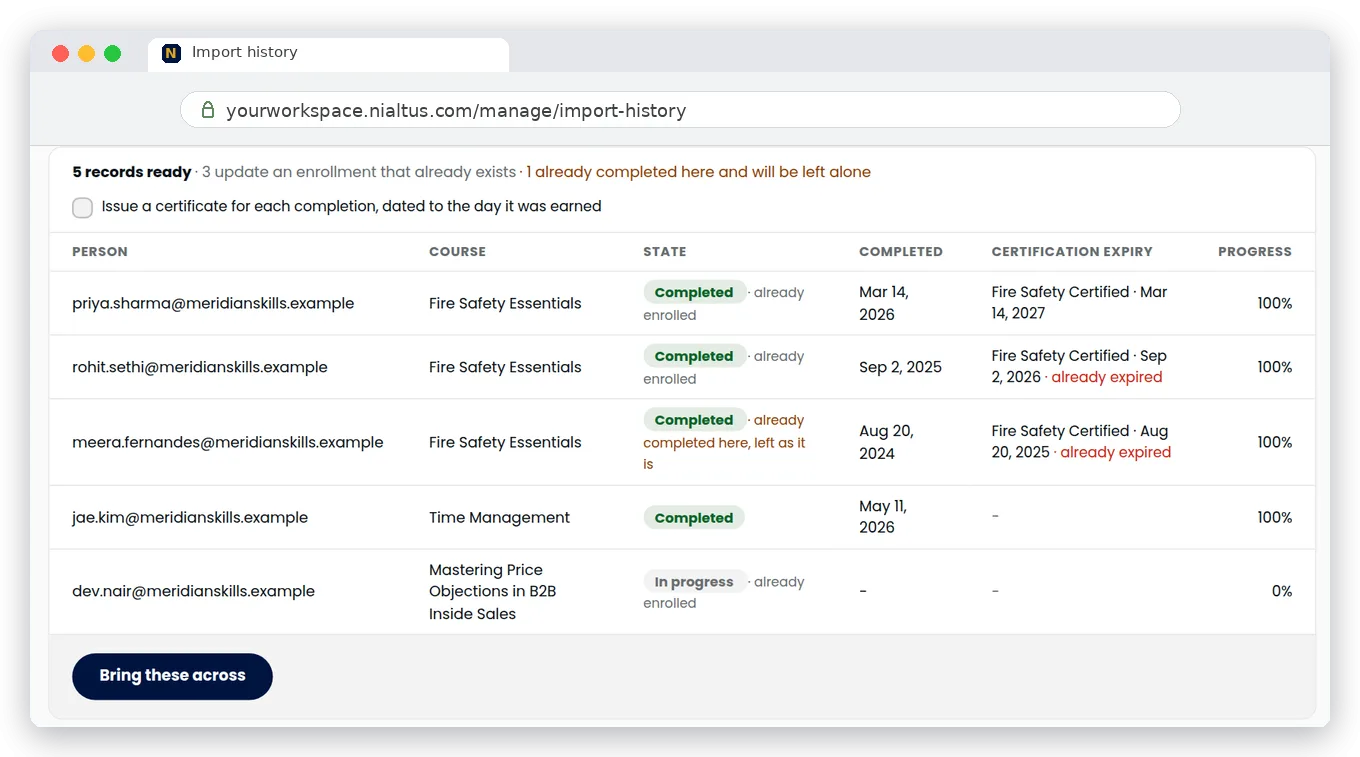
Nialtus import from another LMS
Import your people
Bring completions
Certificates and expiry
CSV import
Map your columns
Nobody starts over

Three reasons the switch is painless

The hard part of changing systems is the history. Nialtus lets you bring it with you.

Nobody starts from zero

Import past completions with their original dates, so a learner who finished compliance training last year still has that completion on day one. Nialtus can issue its own certificate for each one, dated to the day it was earned.

Your records, checked

Completion dates, progress, scores, and expiry dates come across. Every row is matched to a real person and a real course, and a completion Nialtus already holds is never overwritten.

A simple, guided import

Export a CSV from your current system and upload it. You match each item to a column of your file, common column names are matched for you, and you see a full preview before anything is saved.

Bring the history, not just the people

A new LMS usually means everyone restarts. Not here. Import past completions, progress, scores, and expiry dates from a CSV, match your columns, and every learner keeps the record they earned. Completions count toward the certifications you set up in Nialtus and raise the skill levels the course certifies.

  • Import completions, progress, scores, and expiry dates
  • Match your export columns, no renaming needed
  • Learners keep the credit they earned
Ready to import
from your current LMS
People842
Completions1,240
Certifications318

A move that feels like an upgrade

Everything you need to leave your old system behind, cleanly.

Import your people
Add everyone in bulk with the People CSV import, including frontline staff by employee number.
Bring completions
Past completions, progress, and scores, dated to when they happened.
Certificates and expiry
Expiry dates come from your file or from the certification’s validity. Nialtus can issue its own certificates, dated to the original completion.
CSV import
Upload a CSV export from your old system, up to 5 MB.
Map your columns
Match each item to a column of your file. Common names are matched for you.
Nobody starts over
Completions are never overwritten, and progress never goes backwards.

Nialtus checks every row against real people and real courses before anything is saved. Rows that do not match are listed and skipped, never invented, so the history you bring across is the history you had.

Questions we hear a lot

Straight answers about moving to Nialtus.

Planning a switch?

Book a demo and we will walk your migration and map a sample of your data.

Book a demo

Yes. Import completions, progress, and scores from a CSV, matched to each person by email or, for frontline staff without email, by employee number. Learners keep the credit they already earned, dated to when they earned it.
Yes, for courses you set up as certifications in Nialtus. Each imported completion counts toward the certification. The expiry date comes from your file, or from the completion date plus the certification’s validity. Certifications that have already expired show as expired, and people close to expiry get a reminder and the renewal course.
First add your people with the People CSV import, and your courses as SCORM, xAPI, cmi5, or AICC packages, as an IMS Common Cartridge, or built in Nialtus. Then export a CSV of training history from your current LMS, upload it to Import history, and match each item to a column of your file. You choose whether dates are day first or month first, and you see a full preview before anything is saved. We help you get the mapping right.
Yes. Upload SCORM packages in bulk and each one becomes a draft course that takes the package title. You can also create course shells from a CSV, and import live session attendance and learning path progress.
Yes. Every import is kept in an Import log, and you can undo it for 7 days. Undo restores the rows it changed and removes the rows it created. People who have signed in or learned since are deactivated rather than deleted.
Course content that is not a SCORM, xAPI, cmi5, or AICC package or an IMS Common Cartridge has to be rebuilt in Nialtus. Nialtus cannot import Moodle course backup files (.mbz). Certificate files from your old system are not imported. You can bring each old certificate number and its link, which show on the learner’s transcript, and Nialtus can issue its own certificates, dated to the original completion.
Not for the completions you import. Their history comes with them, so nobody starts from zero. A certification that has already expired shows as expired and needs renewing as usual.

Move without losing your history

Book a demo and we will walk your migration and map a sample of your data.