

Authoring studio

Build a lesson like you mean it

A real drag-and-drop studio with more than thirty block types, ready-made designs, and styling on every block. Edit right on the page, and hand the parts you would rather not write to AI.
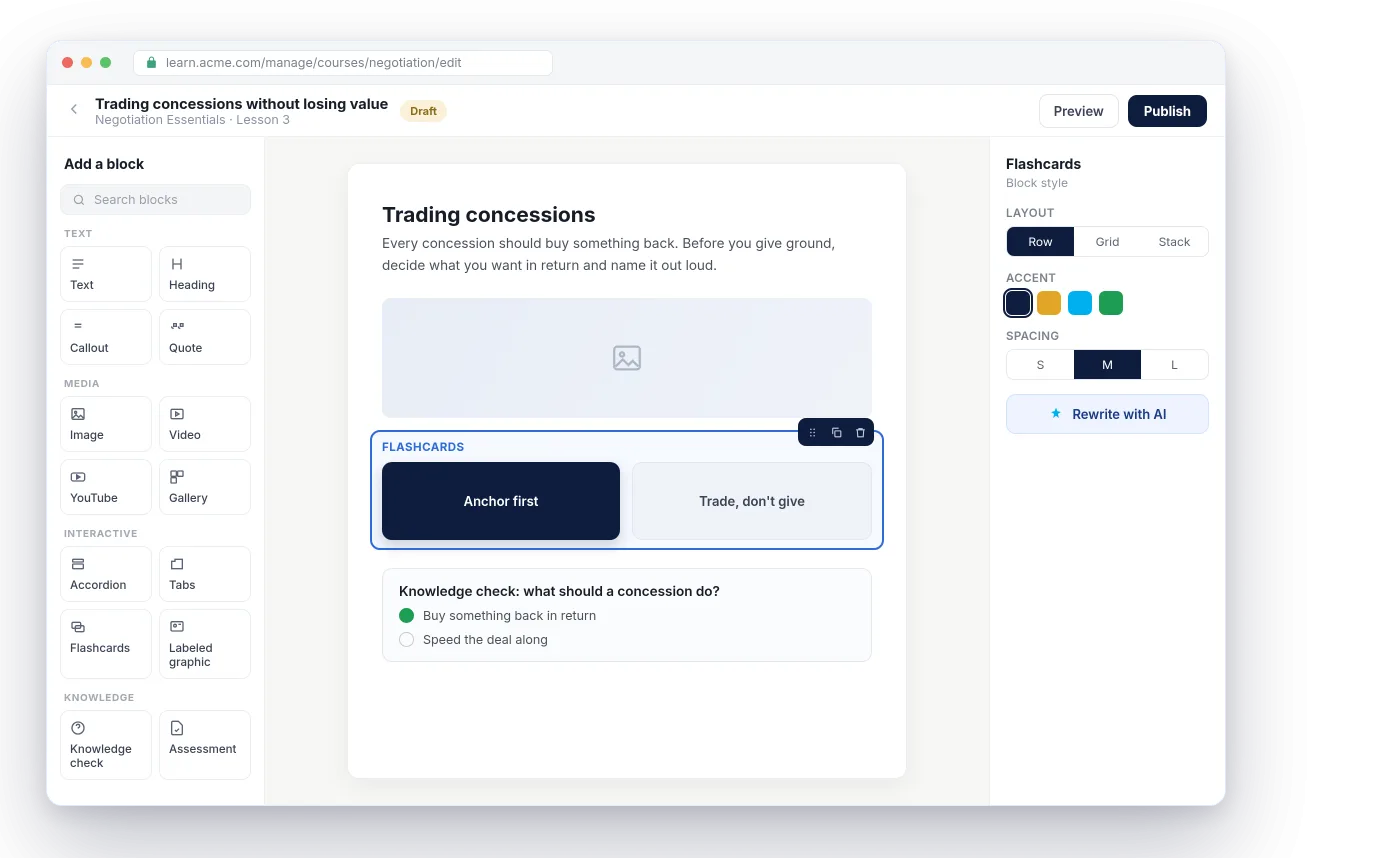
Nialtus course builder
Drag-and-drop builder
30+ block types
91 ready-made designs
On-canvas editing
Per-block styling
AI authoring assist

Three reasons your experts will actually use it

A serious builder that a subject expert can pick up, not a form with a rich-text box.

Build visually, block by block

Assemble a lesson from more than thirty block types, arrange them in columns, and see exactly what the learner will see as you go.

Start from something that looks right

Begin with one of 91 ready-made designs, save any block as a template, and build a custom library so your team stops rebuilding the same intro.

Let AI take the first pass

Draft or rewrite the content of a block with AI, inline, then shape it yourself. The blank page problem, solved.

Thirty-plus blocks, from a callout to a scenario

Text and headings, images and video, accordions, tabs, flashcards, labeled graphics, sorting, branching scenarios, knowledge checks, assessments, SCORM, charts, and more. Drop them in, arrange them in columns, and style each one on its own.

  • Interactive blocks, not just text and images
  • Multi-column layouts that stay responsive
  • Style layout, color and spacing per block
Add a block
Text
Heading
Callout
Image
Video
Gallery
Accordion
Tabs
Flashcards
Timeline
Scenario
Sorting
Knowledge check
Assessment
SCORM
and more, from charts to labeled graphics
Ready-made designs

91 designs

Saved: Our lesson intro
Reuse in any course

Design it once, reuse it everywhere

Start from one of 91 ready-made designs, save any block you like as a template, and build your own custom block library. Your team stops rebuilding the same intro and starts from something that already looks right.

  • 91 ready-made designs to start from
  • Save and reuse your own block templates
  • Build a custom block library for your team

Everything in the authoring studio

A serious builder that a subject expert can use, not a form with a rich-text box.

Drag-and-drop builder
Assemble lessons visually, block by block, in any order.
Rich text editor
Format copy the way you expect, without touching code.
On-canvas editing
Edit right on the page, exactly as learners will see it.
91 ready-made designs
Start from a polished layout, then make it your own.
Saveable block templates
Save a block you like and drop it into any course.
Custom block library
Build your own reusable blocks for a consistent house style.
Per-block styling
Set layout, color, and spacing on any block.
Multi-column layouts
Arrange content side by side, and it stays neat on phones.
AI authoring assist
Draft or rewrite the content of a block with AI, inline.

Learning Everest has built thousands of hours of custom courses by hand. The authoring studio in Nialtus is the tool our own designers wanted, so a subject expert can build something that looks professional.

Questions we hear a lot

Straight answers, so your team knows what the builder can do.

Want a hands-on look?

Book a demo and we will build a lesson with you, blocks, styling, and all.

Book a demo

No. You drag in blocks and edit on the page, and you can start from one of 91 ready-made designs so it looks right from the first draft.
Yes. Save blocks as templates and build a custom block library so every author starts from your approved building blocks.
More than thirty, from text and media to accordions, flashcards, labeled graphics, branching scenarios, knowledge checks, and SCORM.
You can draft or rewrite the content of a block with AI, inline, then edit it yourself. Nothing publishes until you say so.

See the studio in action

Book a demo and we will build a lesson with you, blocks, styling, and all.