

Bring your people and your org chart with you
Nialtus takes your organization the way it already exists: a cost center hierarchy out of your ERP, a staff list out of your HRIS, a spreadsheet from finance, or nothing at all. Two CSVs and an API, no project plan.
Nobody starts from an empty workspace.
Your departments, your teams, your cost centers and your staff list already exist somewhere. The job is not to recreate them by hand. It is to get them in, keep them right, and keep them in step.
Four ways in
Use whichever one matches what you already have.
From your ERP
Export the cost center hierarchy: the centre is the code, the node above it is the parent. That file imports as it stands, with the numbers intact, however many levels deep it goes.
From a spreadsheet
Five columns, most of them optional. Download the template, fill it in, upload it, look at what it would do, then apply it. A unit already here is matched and updated rather than duplicated.
From your HRIS
Post up to 500 people at a time to the sync endpoint and run it nightly. People are matched on email or employee number, so the same call creates who is new and updates who has moved.
From nothing at all
Type the departments in, drag them into shape, and name a manager for each. Or import people with a department column and let the structure build itself as they land.
Start from the file you already have
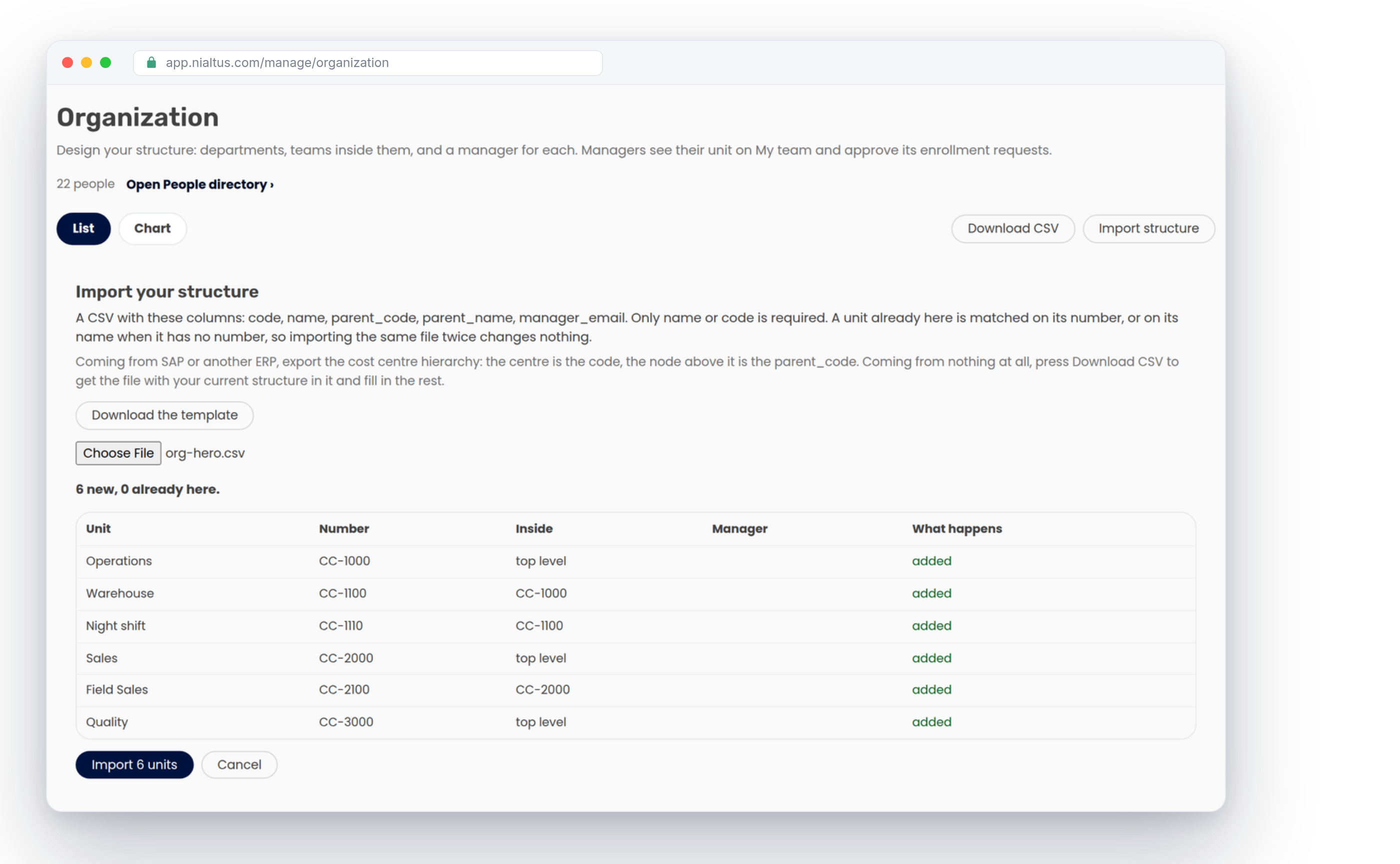
The importer reads the five columns an ERP export already contains: the unit’s own number, its name, the number or name of the unit above it, and the email of whoever runs it. A row with no parent is a department at the top. Everything else hangs off what you name.
There is no depth limit worth worrying about. Divisions inside divisions inside regions all import in one pass, because the file is read as a whole rather than row by row.
Nothing is written until you have looked at it
Choose the file and the screen tells you what it would do, unit by unit: what would be added, what is already here and would be updated, and any row it cannot use, with the line number. You apply it, or you cancel it.
Applying takes three passes, because a hierarchy in a file is never sorted parents first: every unit is created or updated, then each one is put under its parent, then the managers are set. A unit already in the workspace is matched on its number, or on its name when it has none, so importing the same file twice changes nothing at all. Nothing is ever deleted by an import.
People land in the team, not just the department
Most importers understand one level, so everybody ends up sitting directly under a department and every report you run afterwards is one level deep. Here a person can be placed by the unit’s number, in a department_code or cost_centre column, or by a path: Operations / Warehouse / Night shift. Any step of that path that does not exist yet is created as you go.
Somebody with no work email is imported too. They get an employee number and a PIN and sign in on a shared device, which is how most of a factory or a hotel actually works.
Your numbers come with you
Every department and team can carry your own number for it: a cost center, a profit centre, a GL segment, whatever your finance system calls it. It is optional, it does not have to be unique, and two units can book to the same centre.
Once it is in, it is what the importers match on, what the people file points at, and what shows next to the unit on screen, in the chart and in every export. Training spend can be read back the way finance already books it, without a mapping table in the middle.
No system at all, and no file
Plenty of organizations keep the org chart in one person’s head. Type the departments in, add teams inside them, and drag anything into place: drop a unit onto another to make it a team inside it, or onto the bar at the bottom to bring it back up as a department.
When you would rather see it than edit it, the Chart view draws the whole structure with headcount and manager per box, and prints as a PDF for the people who do not have an account here.
Keep it in step without remembering to
A structure imported once is accurate for about a month. The sync endpoint takes up to 500 people a call and matches each one on their email or their employee number, so the same nightly job creates the joiners, moves the movers and updates the titles.
It understands the same two things the CSV does: a unit number, or a path. A field you send is authoritative, so clearing it in your HRIS clears it here, and your HR system stays the single source of truth.
What it unlocks the moment it is in
The structure is not filing. It is what half the platform reads. Enrollment requests go to the unit’s manager, and units without one walk up to the nearest parent who has. Reports, compliance and skills gaps are all read per department. An administrator can be confined to one branch and will only ever see the people inside it.
And every effectiveness figure, the whole Kirkpatrick reading of whether a course worked, can be sliced by the team it was run for.
How it works
Twenty minutes, most of it looking at a preview.
A cost center hierarchy from the ERP, a staff list from the HRIS, or a spreadsheet from whoever keeps it. If you have none of those, download the template.
Upload it, read the preview of what would be added and updated, then apply it. Managers are set in the same pass.
Upload the staff list with a department number or path against each person. Everything missing is created. Frontline staff with no email come in with employee numbers.
Switch to the chart view, see the whole organization, and drag anything that landed in the wrong place.
Run it nightly and stop thinking about it. Joiners, movers and leavers arrive on their own.
What you get out of it
The reason this is worth doing properly on day one.
What the importers handle
All of it optional, none of it a project.
Learning Everest has rolled training out inside manufacturing plants, hospitals and retail chains where the org chart is the hard part. Nialtus was built by the people who had to keep asking for it.
Questions about getting your data in
Straight answers, including where this stops.
Give us a sample file from your ERP or HRIS and we will tell you exactly what it would build.

The LMS that builds courses with you, wraps them in your brand, and keeps every team coming back.
© 2026 Nialtus · Part of Learning Everest Private Limited · Privacy · Cookies · Terms