

Live sessions that set up their own Zoom, Teams or Meet call
Connect your own Zoom, Microsoft Teams or Google Meet account. When you schedule a live session, Nialtus creates the meeting, puts the link in every invite, and reads attendance back after the call. Available on Growth and above.
The call and the record, finally in step
No copying links into invites, and no typing attendance from a meeting report.
The meeting makes itself
Choose Zoom, Teams or Google Meet when you schedule a session. The meeting is created in your account, with the session’s title, time and time zone, and the join link goes into every confirmation and calendar invite.
Changes follow through
Move the session and the meeting moves with it. Cancel it and the meeting is removed. Everyone booked gets an updated calendar invite, so nobody joins an old link.
Attendance without a spreadsheet
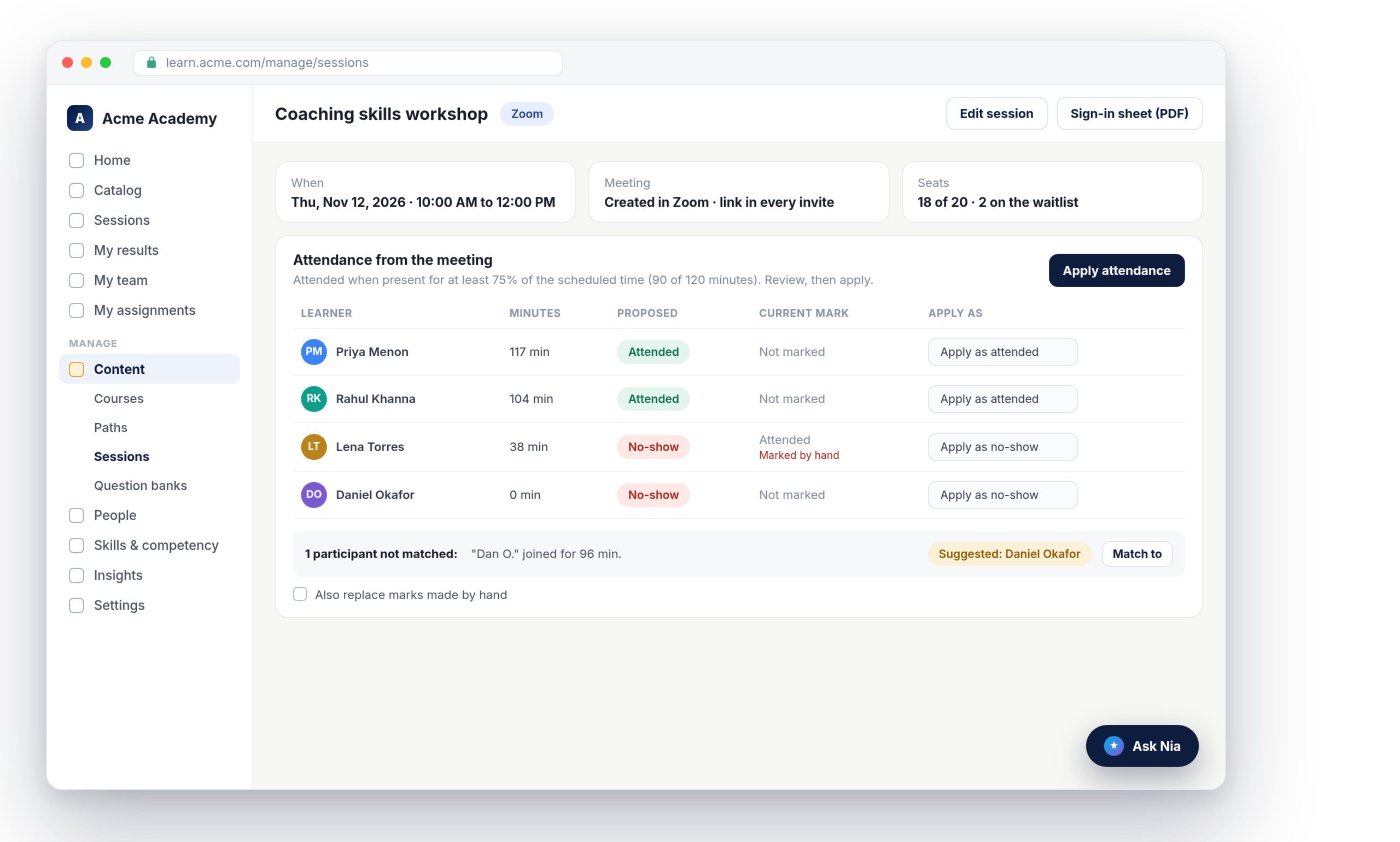
After the call, Nialtus reads who joined and for how long. People over your minimum time are proposed as attended, the rest as no-shows, and a trainer reviews the list before it counts.
Your account, connected in one place
Each workspace connects its own accounts under Settings, Online meetings. Zoom uses a Server-to-Server OAuth app, Teams uses an app registration in Microsoft Entra ID, and Google Meet uses a Workspace service account. Step-by-step guides sit next to each one, and a Test connection button tells you in plain words if something is missing.
Attendance that counts time, not just a click
Nialtus adds up each person’s time across every time they joined and left, so a dropped connection or a second device is counted once. Anyone present for at least your minimum share of the session, 75% by default, is proposed as attended. Each session can set its own minimum.
The trainer has the last word
Participants are matched to learners by email. A name that only looks like a learner is shown as a suggestion, never matched on its own, and guests stay unmatched until a trainer decides. Marks a trainer made by hand are never replaced unless they tick the box to allow it. Once attendance is applied, the live session lesson in the linked course is marked complete.
What the integration does
Everything between scheduling a session and recording who was there.
Nialtus is built and run by Learning Everest, a training company that has run instructor-led programs for enterprise clients for years. Nialtus takes care of the meeting links and the attendance, so trainers can focus on the session.
Questions we hear a lot
Straight answers about Zoom, Teams and Google Meet in Nialtus.
Book a demo and we will schedule a session and show the invite, the meeting and the attendance review.