

Executive reporting

The numbers your board asks for, ready before they ask

A compliance dashboard by department and team, learning hours for every plan, period-on-period comparisons, a board-ready PDF pack you can schedule, and training cost and return where you record them. Executive reports are available on Growth and above.
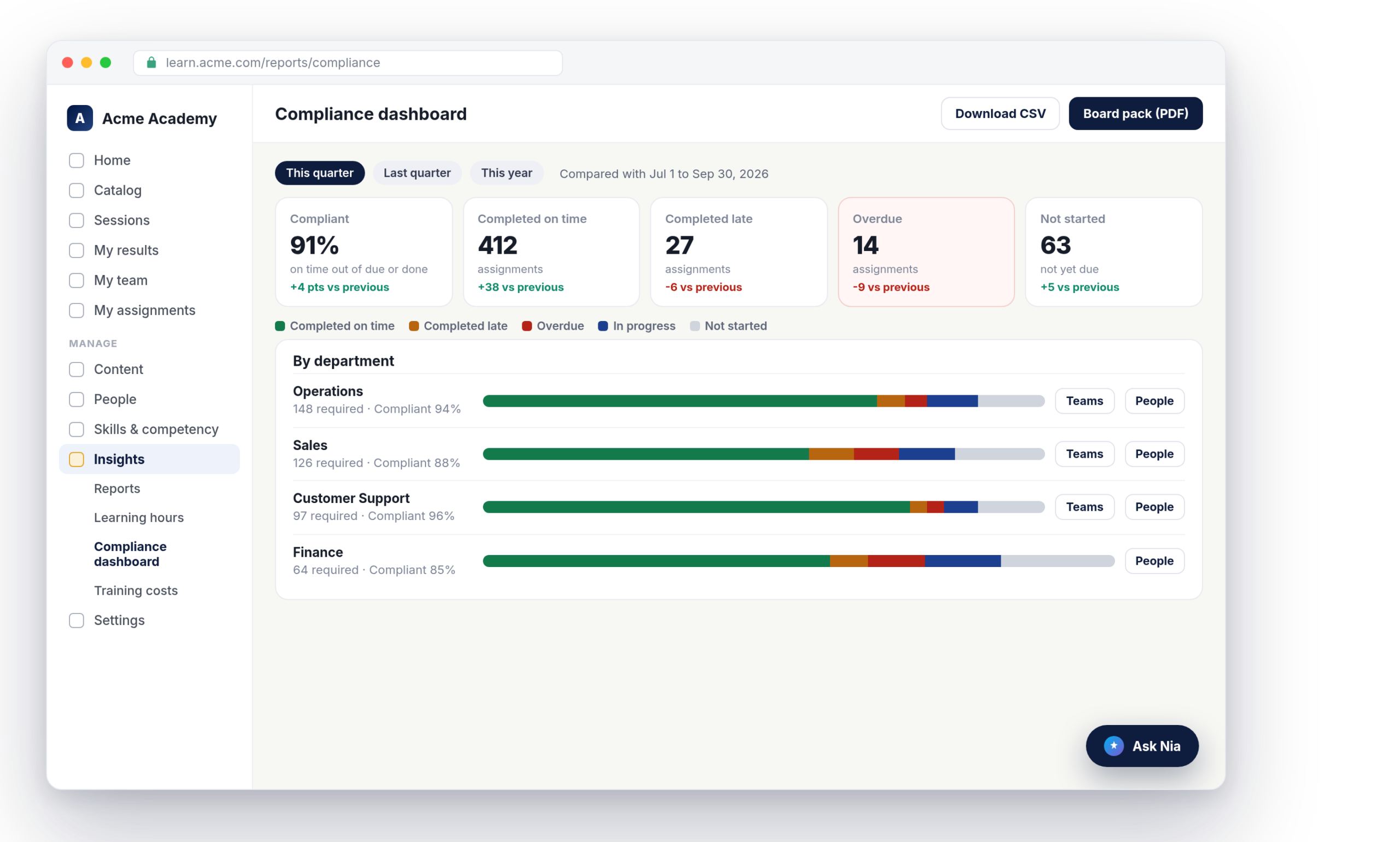
Nialtus compliance dashboard showing required training by department
Compliance by department
On time, late, overdue
Learning hours
This period vs last
Board pack PDF
Cost and ROI

Reporting for the people who sign off

Leadership does not want a data export. They want three numbers and a trend.

Compliance at a glance

Mandatory training split into completed on time, completed late, overdue, in progress and not started, by department, then by team, then by person.

Every number with its trend

Pick this month, quarter, year or a custom range. Each figure shows the change against the period before, so you can see direction, not just a level.

A pack that sends itself

A branded two-page PDF with the headline numbers, compliance, learning hours, top courses, effectiveness and expiring certifications. Download it, or schedule it monthly or quarterly.

Compliance you can drill into

Mark a course, a learning path or a single assignment as mandatory, and it counts toward the dashboard. Compliant means completed by the due date, out of everything that is due or done, so work that is not due yet never drags the number down. Click a department to see its teams, then the people, then one person’s assignments.

  • On time, late, overdue, in progress, not started
  • Department, team and person drill-down
  • Monthly or quarterly trend, plus CSV
By department
This quarter
Operations
94%
Sales
88%
Customer Support
96%
Finance
85%
Compliant share, sample figures
Learning hours
All plans
Hours this quarter
Up from last quarter
3,410 h
Hours per employee
Over active headcount
4.1 h
Credit hours earned
Completed courses
612
Sample figures

Learning hours, measured honestly

Nialtus counts active time only: lessons while the tab is in view and someone is doing something, the session time a SCORM package reports, video watched for the first time, and time in live sessions. It shows hours per month or quarter against the period before, hours per employee, and credit hours earned, by department, person and course. Learning hours are on every plan.

  • Idle time is not counted
  • Credit hours set per course
  • By department, person and course

Cost and return, only where it is real

Record what a course costs to build and deliver, and what a trainer and venue cost for a live session. Nialtus spreads that into spend for the period, cost per learner and cost per completion, by department. Return on investment appears only for a course that has a recorded cost and a business result with a value. Everywhere else it stays blank and says why.

  • Content, delivery, trainer and venue costs
  • Spend by department, per learner and per completion
  • Costs shown only to people administrators
Training costs
This quarter
Data Protection Basics
Cost to date $960 · value $2,000
ROI +108%
Coaching skills workshop
Trainer and venue recorded
No value yet
Return shows only where a value is recorded

What executive reporting includes

Built on the same records as every other report, and scoped to what each reader may see.

Compliance dashboard
Required training by department and team, with drill-down to people.
Learning hours
Active time and credit hours, on every plan.
Period comparisons
Any period beside the one before, with the change on every tile.
Board pack PDF
Two branded pages, on demand or emailed monthly or quarterly.
Training cost and ROI
Spend, cost per learner and return where cost and value are recorded.
Certifications lapsing
Look ahead 30, 60 or 90 days and see who needs to renew.

Nialtus is built and run by Learning Everest, a training company that has reported on training programs for enterprise clients for years. These are the views leadership teams ask for.

Questions we hear a lot

Straight answers about executive and compliance reporting.

Want to see your own board pack?

Book a demo and we will run the compliance dashboard and generate a board pack from sample data.

Book a demo

The compliance dashboard, the board pack and training costs are included with Growth, Scale and Enterprise. Learning hours, period comparisons in reports and CSV exports are on every plan.
A required assignment completed by its due date. The share is on-time completions out of everything that is due or done, so training that is not due yet is left out.
Only active time counts. The lesson player reports while the tab is visible and the learner did something in the last two minutes. SCORM session time, first-time video watching and live session time are added, without counting the same minutes twice.
Yes. Schedule it monthly or quarterly and it is built for the period just ended and sent as a PDF from your own email account.
No. Costs are optional. Without them the cost report stays empty, and return on investment is shown only where both a cost and a business value exist.
Every report follows the reader’s access. Branch admins see their branch, managers see their team, and costs are visible only to people who manage people.

Walk into the next review with the answers

Book a demo and we will build a compliance view and a board pack on sample data.