

Reminders and notifications

Reminders that get training done, from your own mailbox

Due-soon reminders, overdue escalations to managers, a weekly team digest, approval and certificate emails, all branded and sent from your own email account. People choose which optional emails they get, and the essential ones always arrive.
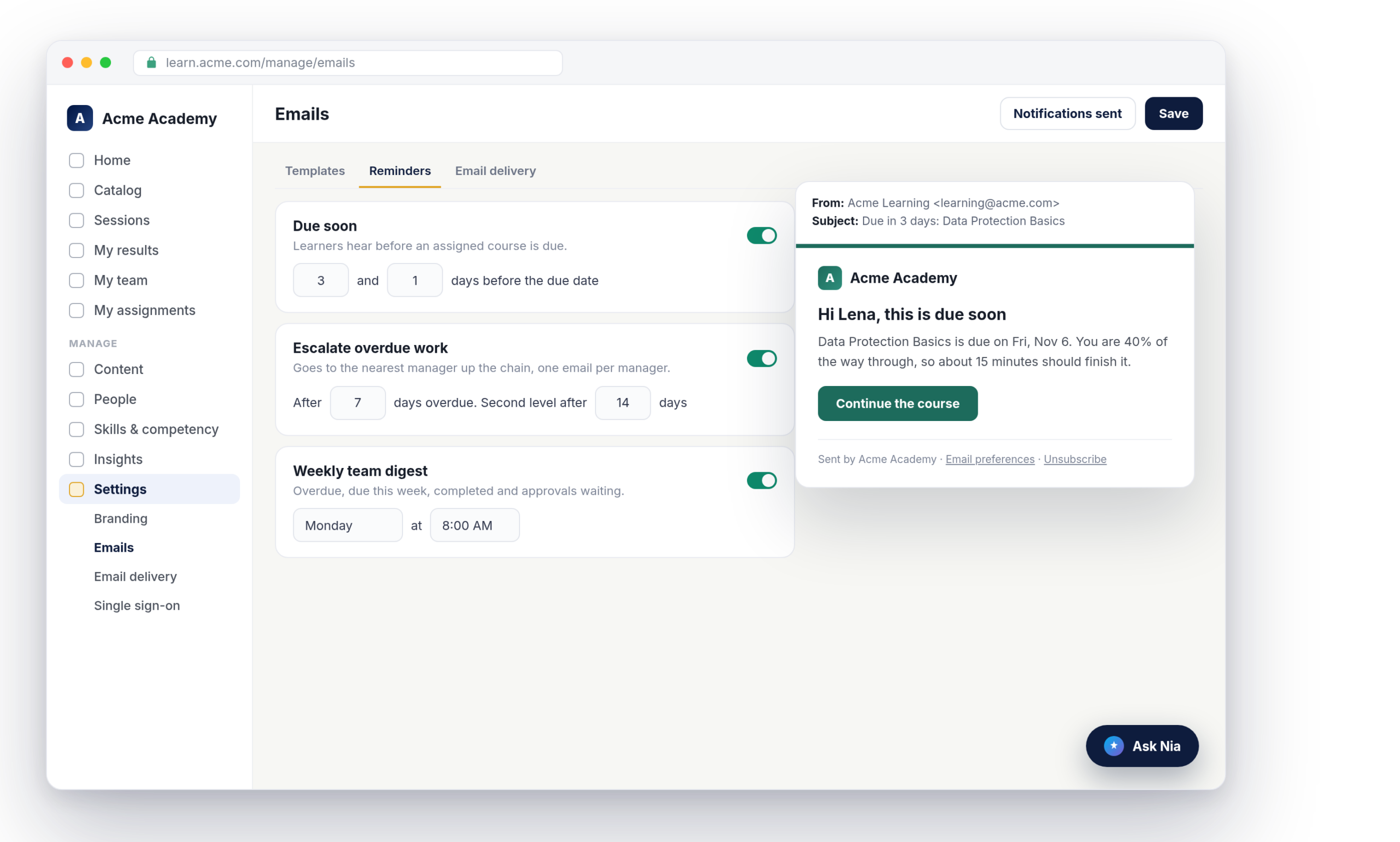
Nialtus reminder settings with a branded due-soon email
Due-soon reminders
Escalation to managers
Weekly team digest
Sent from your mailbox
Your brand on every email
Email preferences

The right email to the right person, once

Reminders work when they are timely, specific and rare. These are all three.

Before it is late

Learners hear three days and one day before an assignment is due, by default. Each reminder fires once per due date, and a late run sends one email, not several.

When it is late

After seven days overdue, the nearest manager up the chain gets one email listing every overdue item for their people. An optional second level goes one step higher.

Every week

Managers get a Monday digest of overdue work, what is due in the next seven days, what was completed, and approvals waiting for them. No digest is sent when there is nothing to say.

Sent from your account, never a shared sender

Connect your own SMTP server or Microsoft 365 under Email delivery, on every plan. Every invite, reminder and certificate goes out from your address, with your reply-to. A configuration must pass a test email before it is used. Until email is connected, messages are held, not lost, and can be resent with a click.

  • SMTP or Microsoft 365, on every plan
  • Test email required before sending
  • Held mail resent once you connect
Email delivery
Connected
From
Acme Learning <[email protected]>
Last test
Passed today
Send test
Acme Academy
Hi Lena, this is due soon
Data Protection Basics is due on Fri, Nov 6.
Continue the course
Sent by Acme Academy · Email preferences · Unsubscribe

Branded, readable and easy to act on

Every email uses your logo and brand color, with a button that is checked for contrast so it stays readable. Each message has a plain-text version, and emails go out in the language each person uses. The footer says it was sent by your workspace.

  • Your logo and brand color
  • Plain-text version of every email
  • Written in each person’s language

People choose the optional emails

Due-soon reminders, the team digest, the activity round-up and announcements can be switched off from an Email preferences page or a one-click unsubscribe link. Invites, password resets, assignments, overdue notices, approvals, compliance and certificates always arrive, and the preferences page explains why.

  • One-click unsubscribe for optional email
  • Essential email always delivered
  • A notifications page for every learner
Email preferences
Due-soon reminders
Optional
On
Weekly team digest
Optional
Off
Assigned training and overdue notices
Always arrive
Essential

Every message the platform sends for you

Settings for each workspace, on every plan.

Due-soon reminders
Days before the due date that you choose, once per assignment.
Overdue escalations
To the nearest manager up the chain, with an optional second level.
Weekly team digest
On the weekday and hour you choose, skipped when there is nothing to report.
Approval emails
Requests go to the people who can approve, and decisions go back to the learner.
Certificate expiry
Learners are warned before a certificate lapses, and their manager gets a copy.
Notifications sent
Admins see every email with its status: sent, held, not sent or sent later.

Nialtus is built and run by Learning Everest, a training company that has run enterprise training programs for years. Reminders work best when they are few, clear and from your own address.

Questions we hear a lot

Straight answers about reminders and email in Nialtus.

Want to see the emails?

Book a demo and we will show the reminder settings and the emails your people would receive.

Book a demo

Yours. Each workspace connects its own SMTP server or Microsoft 365 account, and mail is sent only from that address. Nialtus never sends your training emails from a shared address.
Messages are held, not sent. Admins see a banner with how many are waiting, and can resend them once email is connected. Invite links are refreshed on resend so they still work.
Yes. Choose the days before the due date, the number of days overdue before an escalation, an optional second level, and the weekday and hour of the team digest.
Learners can switch off optional emails such as due-soon reminders and announcements. Essential emails such as assignments, overdue notices, approvals and certificates always arrive.
Yes. Notifications sent has an Emails tab listing every message with its subject, recipient and status. Learners have their own notifications page with everything they were sent in the app.
Reminders, digests, escalations and your own email delivery are on every plan.

Let the reminders do the chasing

Book a demo and we will set up reminders and show the emails your people and managers would get.