Accessible learning, for the people who take it and the people who build it
Keyboard-friendly lessons, screen reader labels, light, dark and high-contrast modes, captions, transcripts and image descriptions, plus an accessibility check that helps authors fix problems before learners meet them.
Accessible by default, not by afterthought
We aim for WCAG 2.1 level AA. We say plainly where we are not there yet.
For learners
Interactive blocks such as sorting, matching, tabs, flashcards and hotspots work with a keyboard and announce what happened. Dialogs keep focus inside and close with Escape, and a skip link jumps to the content.
For every brand
Learners can choose light, dark, high contrast or high contrast dark. Your brand colors are kept, but any text color that would be too faint is adjusted automatically to stay readable.
For authors
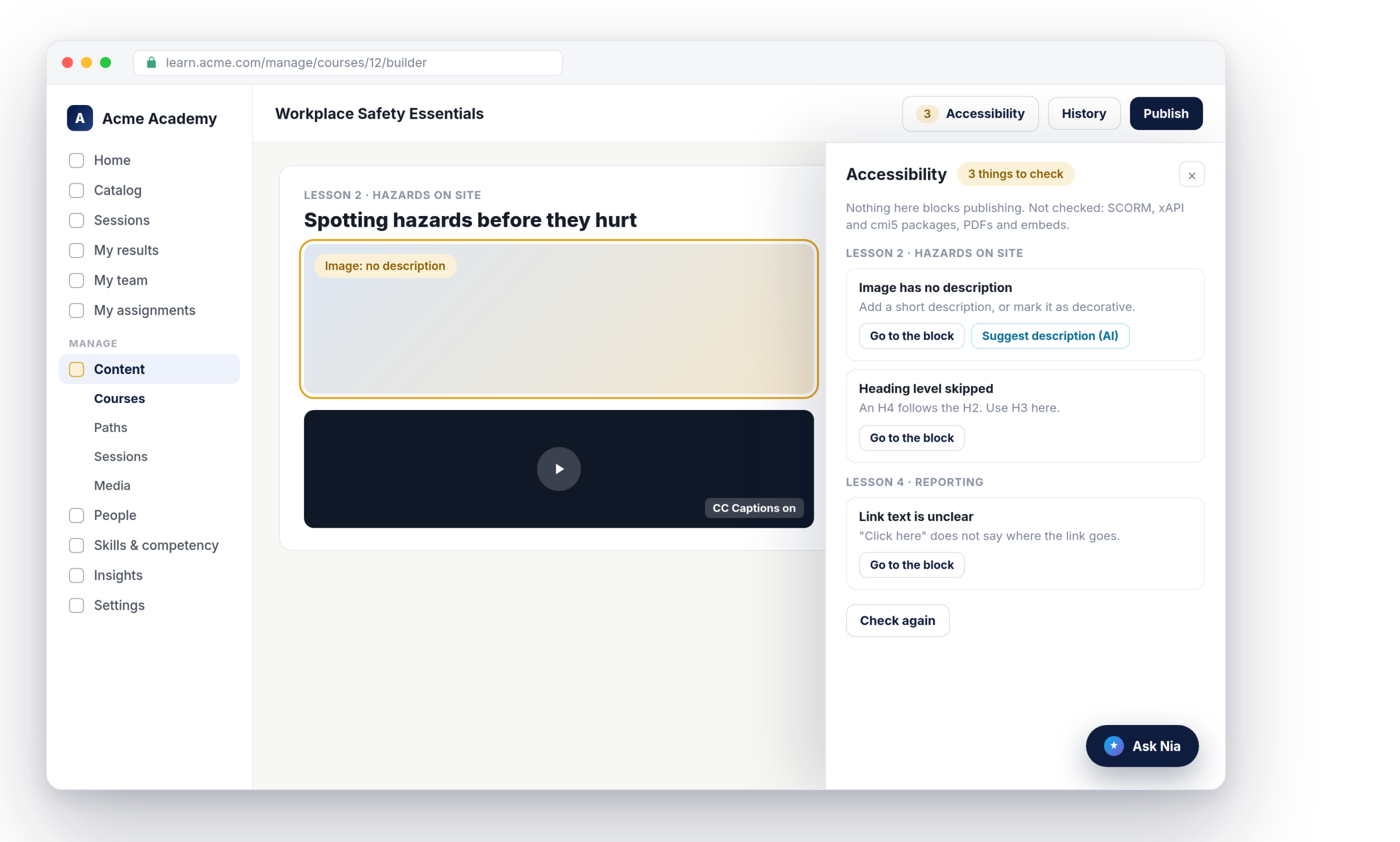
An Accessibility panel in the course builder lists what to fix, block by block, with a button that takes you there. It warns and never blocks publishing.
A checker that knows what to look for
The check covers images with no description, videos with no reviewed captions, audio with no transcript, skipped heading levels, unclear link text such as “click here”, low contrast, tables with no header row, and phrases that rely on color alone. Each course shows its status in the course list, and you can filter for courses with warnings.
Captions, transcripts and image descriptions
Upload captions as VTT or SRT files in as many languages as you need, or let AI draft them from the video’s audio on Launch and above. AI captions stay a draft until an author reviews them. AI can also suggest an image description, which you edit or discard. Audio blocks carry a transcript that learners can open.
Honest about third-party content
SCORM packages, embeds and files are only as accessible as the tool that made them, and the builder says so. Authors can attach an accessible version, a file or a text version, which learners open from a link under the block. Course text also follows the course’s own language and direction, so an Arabic course reads right to left even inside an English workspace.
What accessible learning includes
For learners, authors and admins, on every plan unless noted.
Nialtus is built and run by Learning Everest, which builds training for global audiences, including courseware in 17 languages for Barry Callebaut. Nialtus is built so that training reaches every learner.
Questions we hear a lot
Straight answers about accessibility in Nialtus.
Book a demo and we will run the accessibility check on a course and show captions and display modes.