
Reach the people who never sit at a desk
Deliver short, mobile learning to frontline and deskless teams, including the ones without a work email. Staff sign in with an employee number and a PIN, on their own phone or on a shared device on the floor, and supervisors run their team from one screen.
Most training is built for a desk your frontline never sits at
Retail associates, drivers, crews, and field staff make up the majority of many workforces, yet most learning platforms assume a laptop and an hour of quiet. Nialtus is built for people on their feet, learning in short bursts from the phone in their pocket.
Built for people on their feet
Learning that fits a shift, not a classroom.
On the phone in their pocket
A mobile-first experience means a frontline worker can learn between tasks, wherever the work is, without a laptop or a booked room.
No work email required
Staff without a company email get an account keyed by their employee number and a PIN. The PIN you hand over is temporary, and they choose a private one at first sign-in.
In their language
Deliver the same training in the many languages a frontline workforce speaks, so it lands rather than half-lands.
Onboard the frontline in days, not weeks
A guided, mobile onboarding path gets new frontline staff safe and productive quickly, without pulling them off the floor for a classroom or tying up a manager for a week of shadowing. Because they can start on their own phone, sometimes even before their first shift, a new starter walks in already knowing the basics rather than learning everything on the job. When turnover is high and volumes spike seasonally, the speed at which you can get a new frontline worker productive is a direct lever on how well the whole operation runs.
Learning that fits between tasks
A frontline worker does not have a spare hour, but they have two minutes between customers, deliveries, or tasks. Nialtus is designed around that reality, with short lessons and daily drills that fit into the natural gaps of a shift. Instead of asking people to find time they do not have, the learning slots into time they already have, which is the difference between training that gets done and training that is perpetually postponed. Small and frequent beats long and rare for people who are always moving.
Keep the essentials sharp every day
Frontline workers are often trained once and then out on the floor or the road for months, during which the details quietly fade. Two-minute daily drills keep safety habits, service standards, and process details fresh, so knowledge stays current instead of decaying until something goes wrong. Because the drills are short, mobile, and can carry an optional streak or a bit of friendly competition, they become a light daily habit rather than a chore, which is exactly why they keep working long after the initial training.
Train every team in their own language
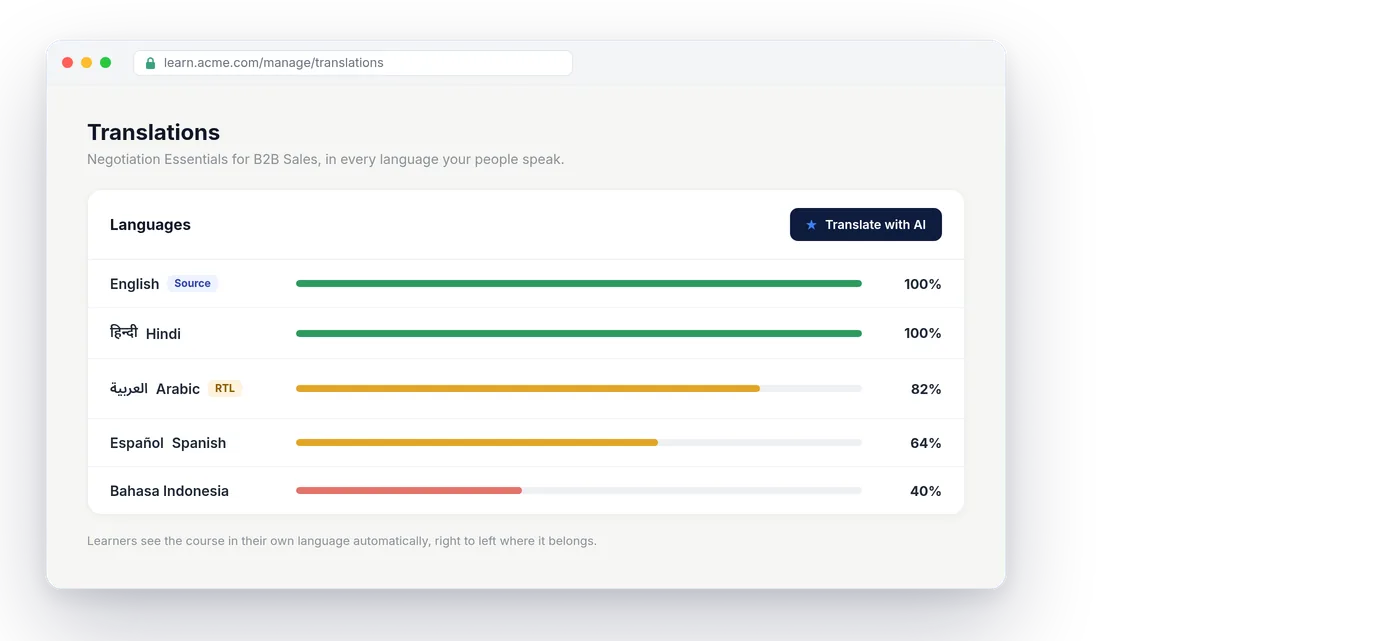
Frontline workforces are often the most linguistically diverse part of a company, and a safety or service message only works if the person genuinely understood it. Nialtus runs in English and 22 more interface languages, including right-to-left Arabic, translates course content with AI, and lets each learner pick their own language, so nobody is trained in a language they only half follow. Reaching every worker in the language they think in is not a nicety on the frontline, it is often the difference between a message that changes behavior and one that washes over people.
Confirm the hands-on skills
Much frontline competence is physical, whether it is operating equipment, following a service routine, or handling a product correctly, and a quiz cannot confirm any of it. Nialtus lets a supervisor add a practical, observed sign-off, so someone confirms the worker can actually do the task, recorded with the assessor and date. That turns frontline training from something people watched into something they can demonstrably do, which matters enormously when the work is physical and the consequences of getting it wrong are real.
See who is ready, team by team
When your workforce is spread across shifts, sites, and roles, you need to see readiness at a glance rather than chase it person by person. A skills view shows who has completed what and who is ready, grouped by team, so a supervisor knows exactly where the gaps are before they become a problem on the floor. Visibility across a large, moving frontline is hard to get any other way, and it is what lets managers act early instead of discovering a training gap only when something goes wrong.
Shared devices and supervisor tools on the floor
Not every site has a device per person. A supervisor turns a shared tablet or desktop into a shared device, and staff sign in with their employee number and PIN, or by showing a printed QR badge to the device camera, a phone camera, or a USB or Bluetooth scanner. The device signs each person out after a period of inactivity, so the next person never inherits someone else’s session. From My team, supervisors add people, reset PINs, print badges, and deactivate accounts, while head office keeps one view of the whole frontline. Progress, assignments, certificates, and reports work exactly as they do for any other learner.
How frontline training works in Nialtus
From a new starter’s phone to a whole distributed frontline.
Create short lessons and drills, or use AI to draft them, designed for a phone and a two-minute window.
A supervisor adds a starter by employee number and hands over a temporary PIN, and a guided path gets them productive in days.
Two-minute drills keep safety, service, and process fresh in the gaps of a shift.
Supervisors sign off hands-on skills, so competence is proven, not just quizzed.
A skills view shows who is ready, team by team, whether they signed in on a phone or a shared tablet.
What frontline training delivers
The payoff of reaching the people on their feet.
What frontline teams need
Mobile, short, and in their language.
Learning Everest has trained frontline and field teams across industries. Nialtus puts that training in every worker’s pocket, in the language they speak, in the gaps of their day.
Frontline training questions
Straight answers on how Nialtus reaches deskless teams.
Tell us your teams and we will show a mobile rollout, or read how frontline learning works.
Reach every worker, wherever they are
Book a demo and we will show frontline training in Nialtus, or see how frontline learning works.